Case Study
Forecast AI
Forecast AI helps AR teams interpret AI predictions correctly not blindly trust them.
Role
Lead Product Designer
Team
PM, Engineering squad, AI/ML Engineer
Timeline
~ 3 weeks
Overview
I led the redesign of Forecast AI, an invoice payment prediction feature, to address a deeper trust issue hiding behind a simple UI request.
Instead of optimizing for speed or visual polish, this project focused on how users understand, trust, and act on AI-driven predictions in financial workflows.
Why Forecast AI?
Users who are Account Recievable manager/Collectors, they need to track cashflow manually for their financial decision such as budgeting, follow up with customers, decision for credit increase/decrease etc.
They had some pain points:
- Relying on "gut feeling" and personal relationships to predict payments
- Using manual notes like "Customer A is always 20 days late but always pays."
- Struggling with handoffs when team members were absent → affects customer relationships
The Real Problem
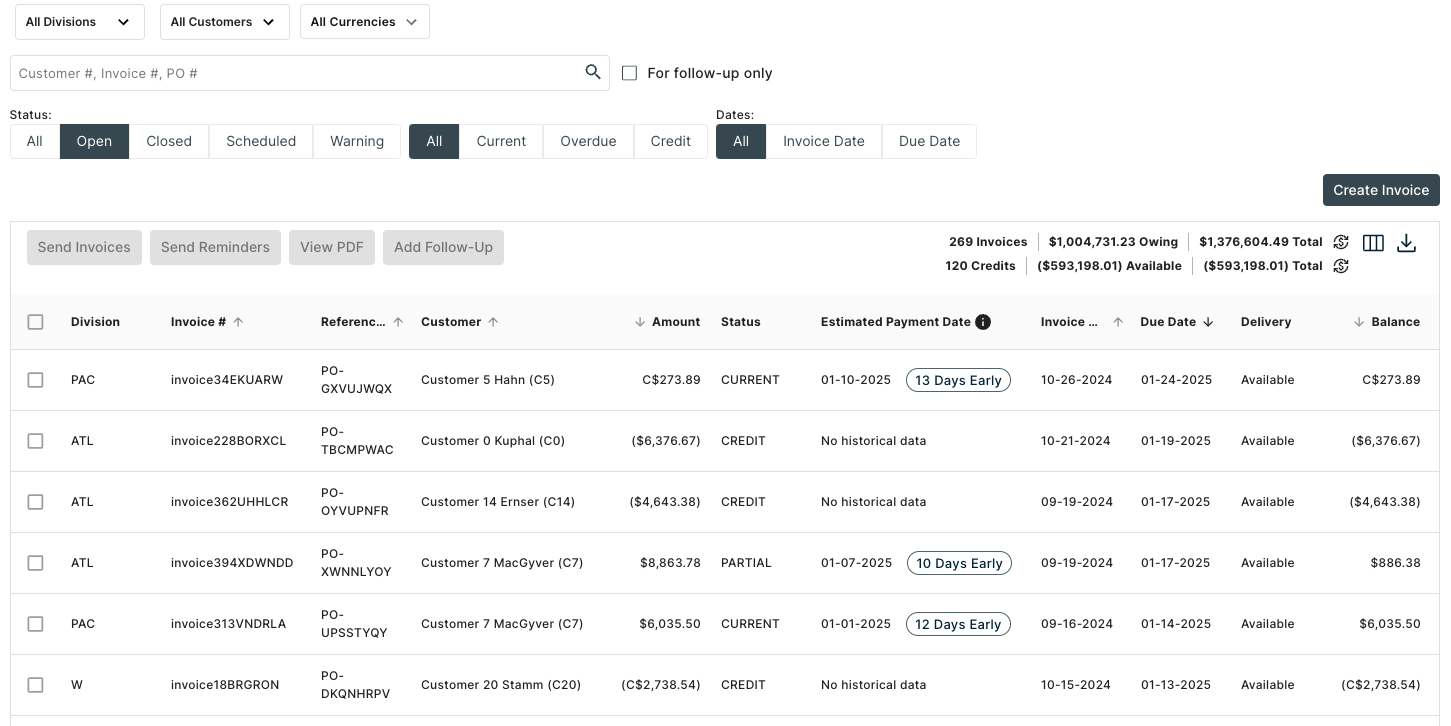
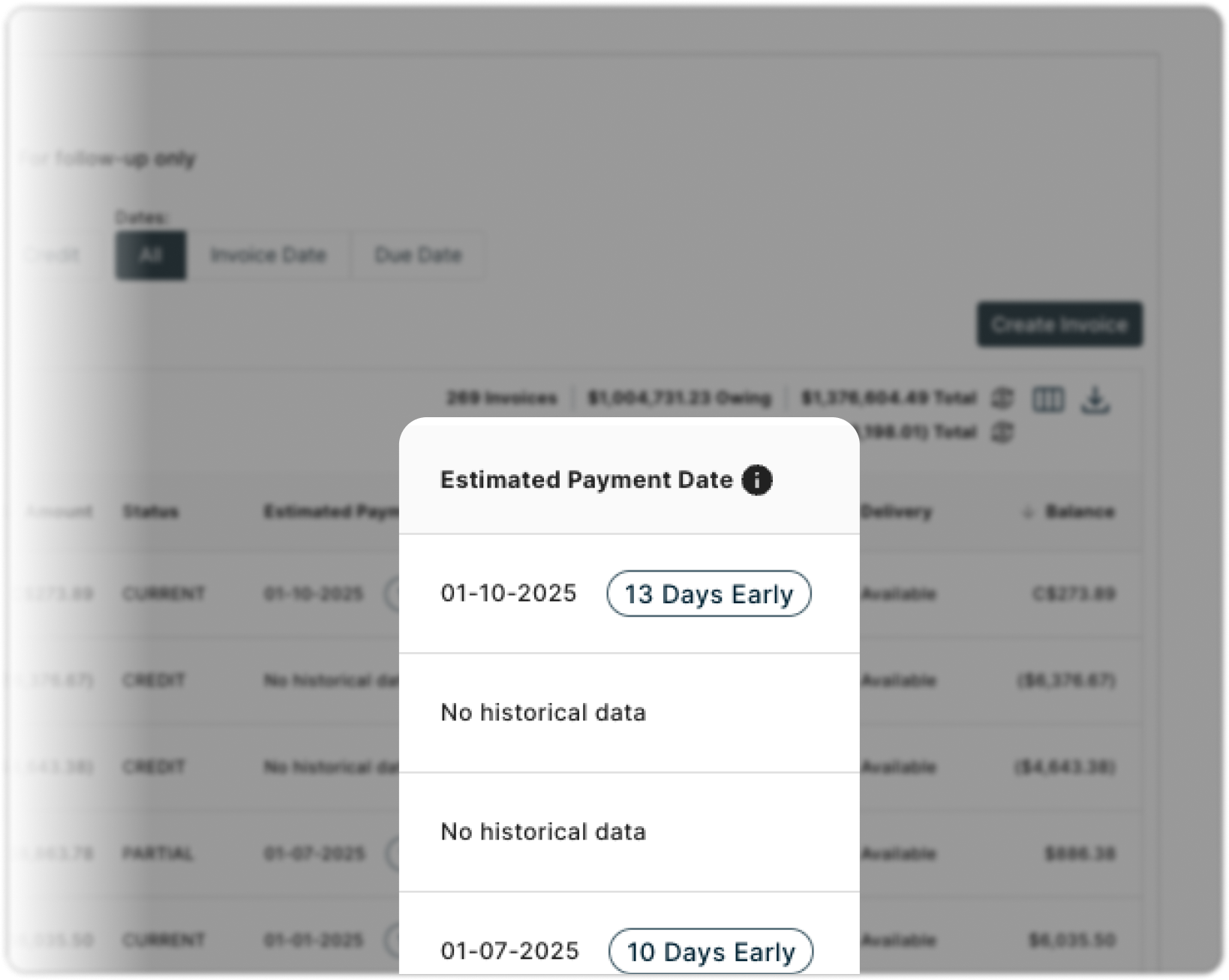
The column header was too long and was breaking the table layout (in QA environment). On the surface, this looked like a straightforward UI fix.
The original request from PM:
"Can you shorten 'Estimated Payment Date' ?The table layout is breaking."
But, was that a real problem?
I quickly ran user interviews through usertesting.com (4 ICP users)
But when I looked closer, I saw a bigger risk:
- User didn’t recognise this is from AI/ML
- Users were treating AI predictions as deterministic dates, not probabilistic guidance.
- When predictions were slightly off, trust in the entire system dropped and users reverted to manual tracking.
This wasn’t a layout problem. It was a trust and interpretation problem.
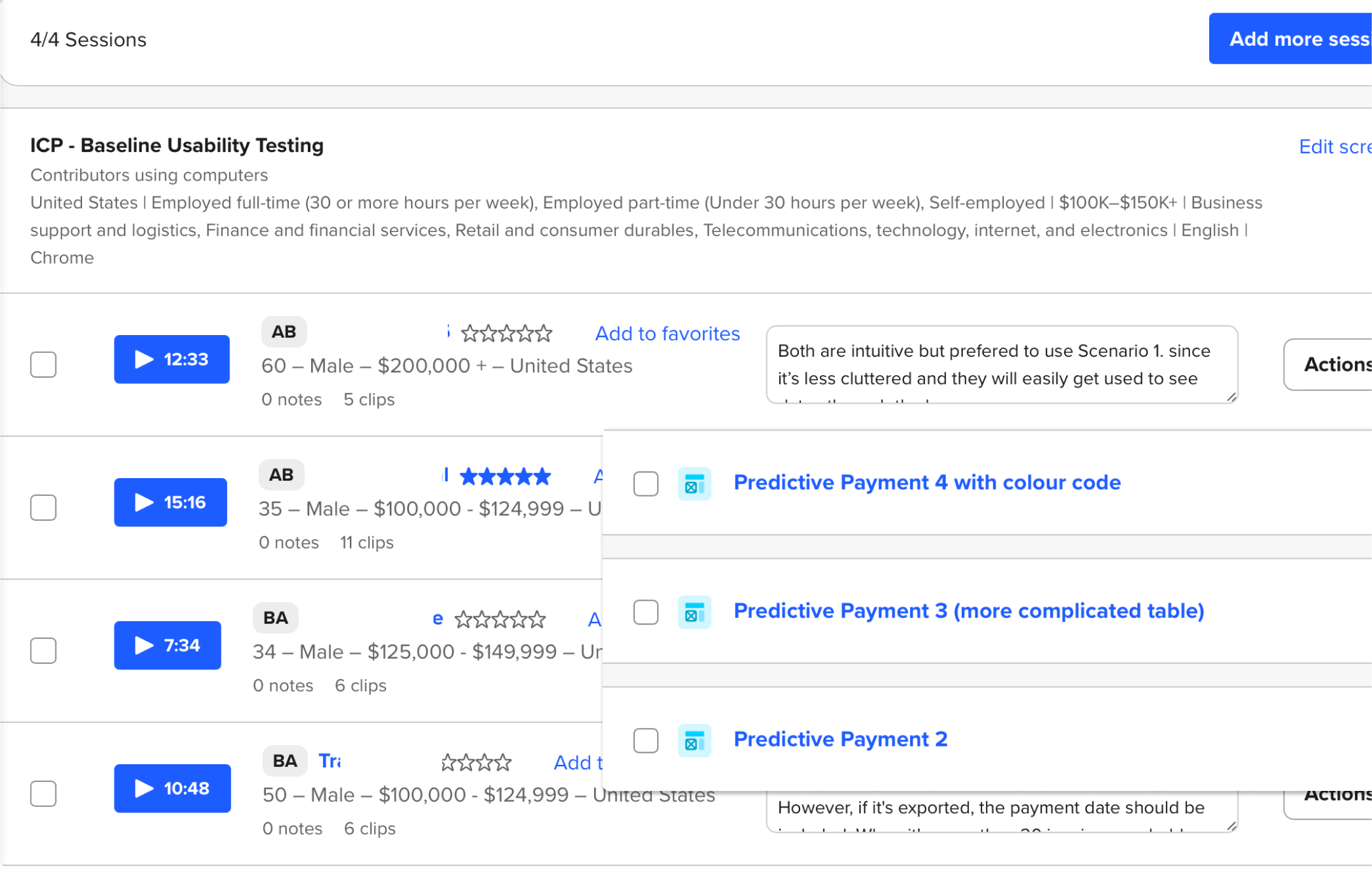
User interview sessions at Usertesting.com
What I Anchored On - Frame the real problems
Before jumping to solutions, I validated whether this trust issue was real. From quick user interviews and pattern analysis, three issues stood out:
No AI transparency
Users had no signal that predictions were AI-generated.
High cognitive load
Dense date + day-count information made the table hard to scan.
Tribal knowledge lived outside the system
Relationship-based payment patterns existed only in people’s heads.
These insights reframed the goal:
Design an AI experience that users can interpret correctly with trust and offer the valuable information to take actions.
Trade-off:
Ship fast vs. fix the root issue. I chose to push back on the quick fix and reframe the problem as:
From
"Shorten 'Estimated Payment Date'"
→
To
How might we clearly communicate AI predictions and its uncertainty?
How might we reduce cognitive load while maintaining information depth?
How might we capture relationship knowledge in the system?
Three Strategic Design Decisions
Decision 1 —Naming & UX Writing: Setting the Right Mental Model
Trade-off: Clarity vs. false certainty
“Estimated Payment Date” sounded deterministic.
→ Users treated it as a promise.
I renamed it to “Forecast” to signal probability, not certainty.
Like a weather forecast, the word signals probability rather than certainty, resetting expectations before any interaction happens.
Estimated Payment Date
→
Forecast
Like a weather forecast,
the word signals probability rather than certainty,
resetting expectations before any interaction happens.
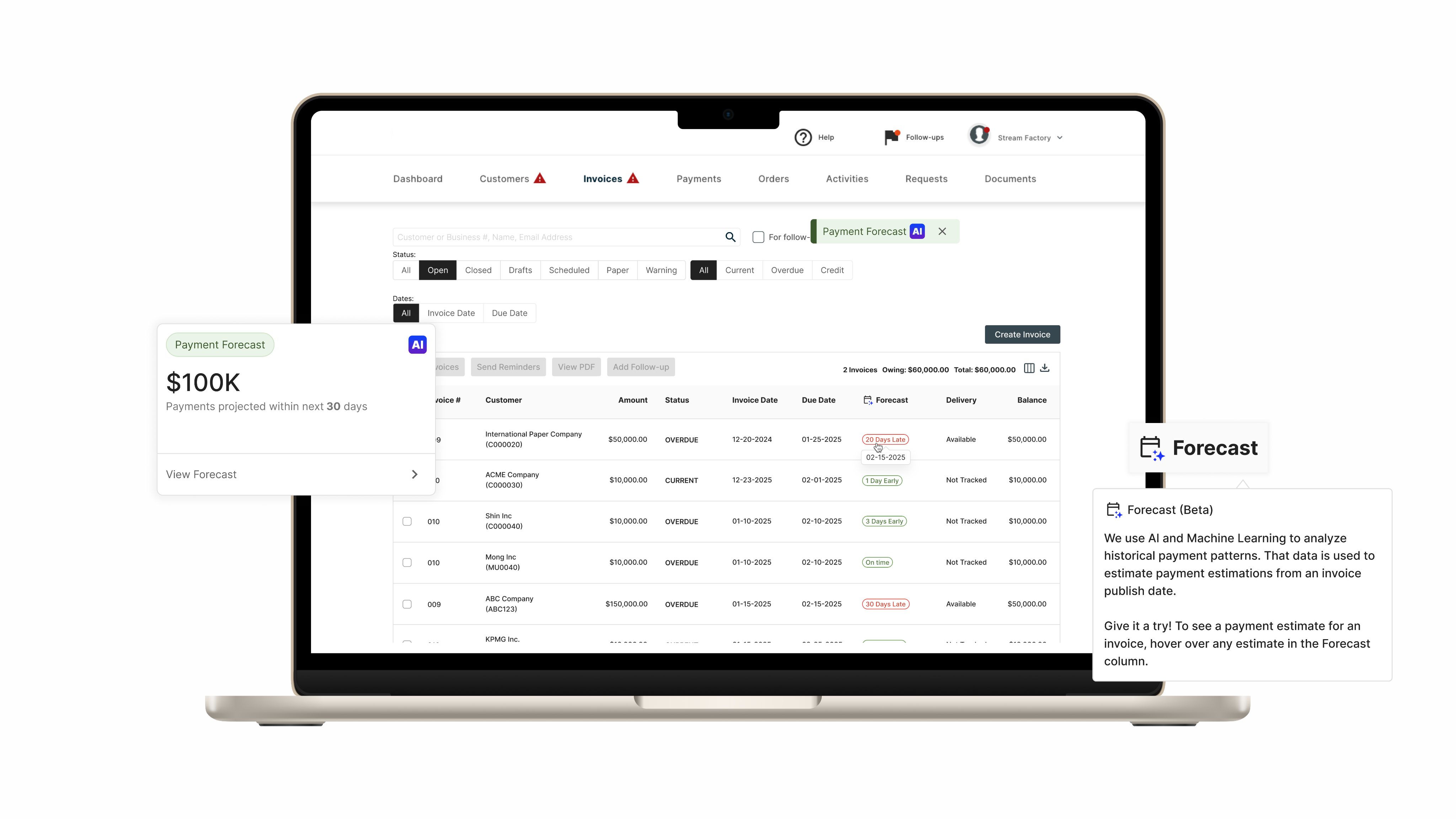
To reinforce that mental model, I paired the name with concise tooltip copy that explains the prediction is AI-generated and based on historical payment behavior.
This wasn’t just UX writing —
it was a deliberate trust-setting decision.
Forecast

Forecast (Beta)
We use AI and Machine Learning to analyze historical payment patterns. That data is used to estimate payment estimations from an invoice publish date.Give it a try! To see a payment estimate for an invoice, hover over any estimate in the Forecast column.

Decision 2 — Use Progressive Disclosure to Reduce Cognitive Load
Trade-off: Show everything vs. show what matters first
PM
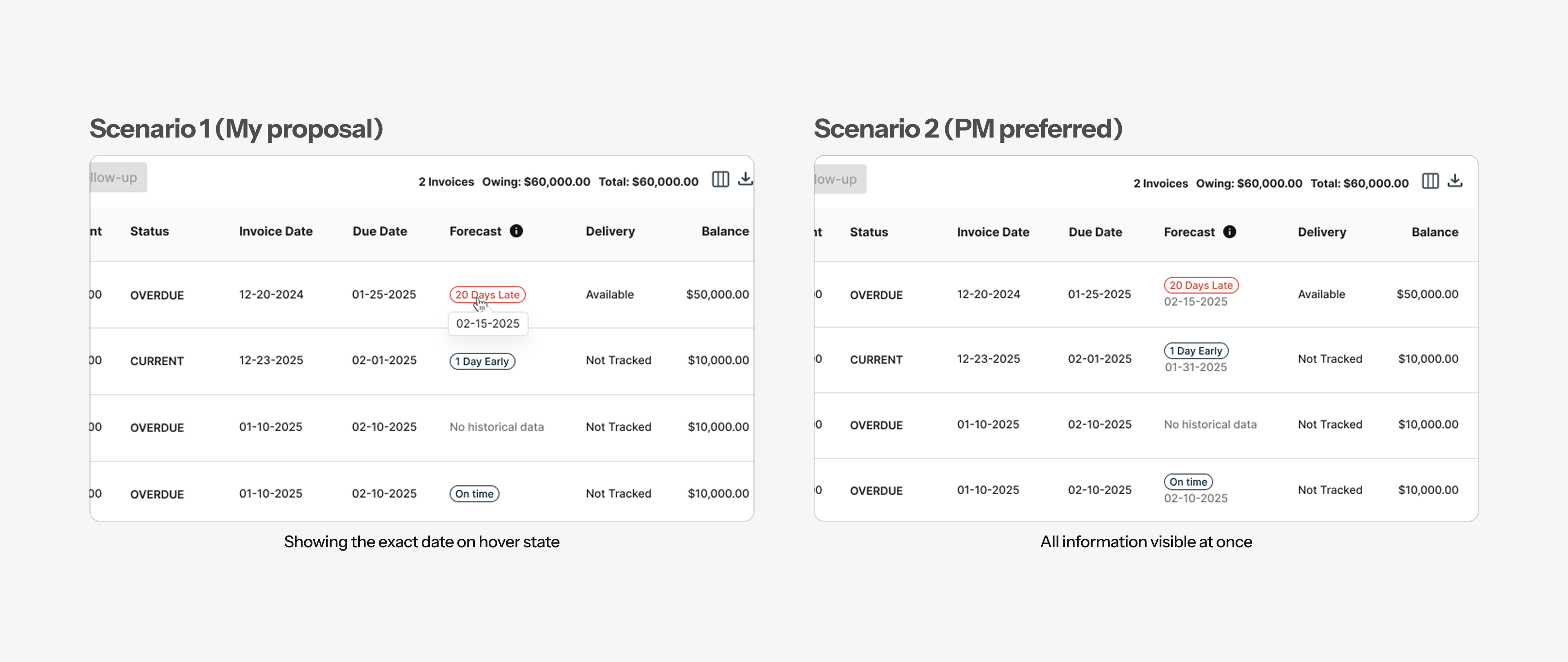
Show everything at once (Status + Days + Date)
Users
Low cognitive load, scannable interface
A/B Testing
I designed a progressive disclosure model:
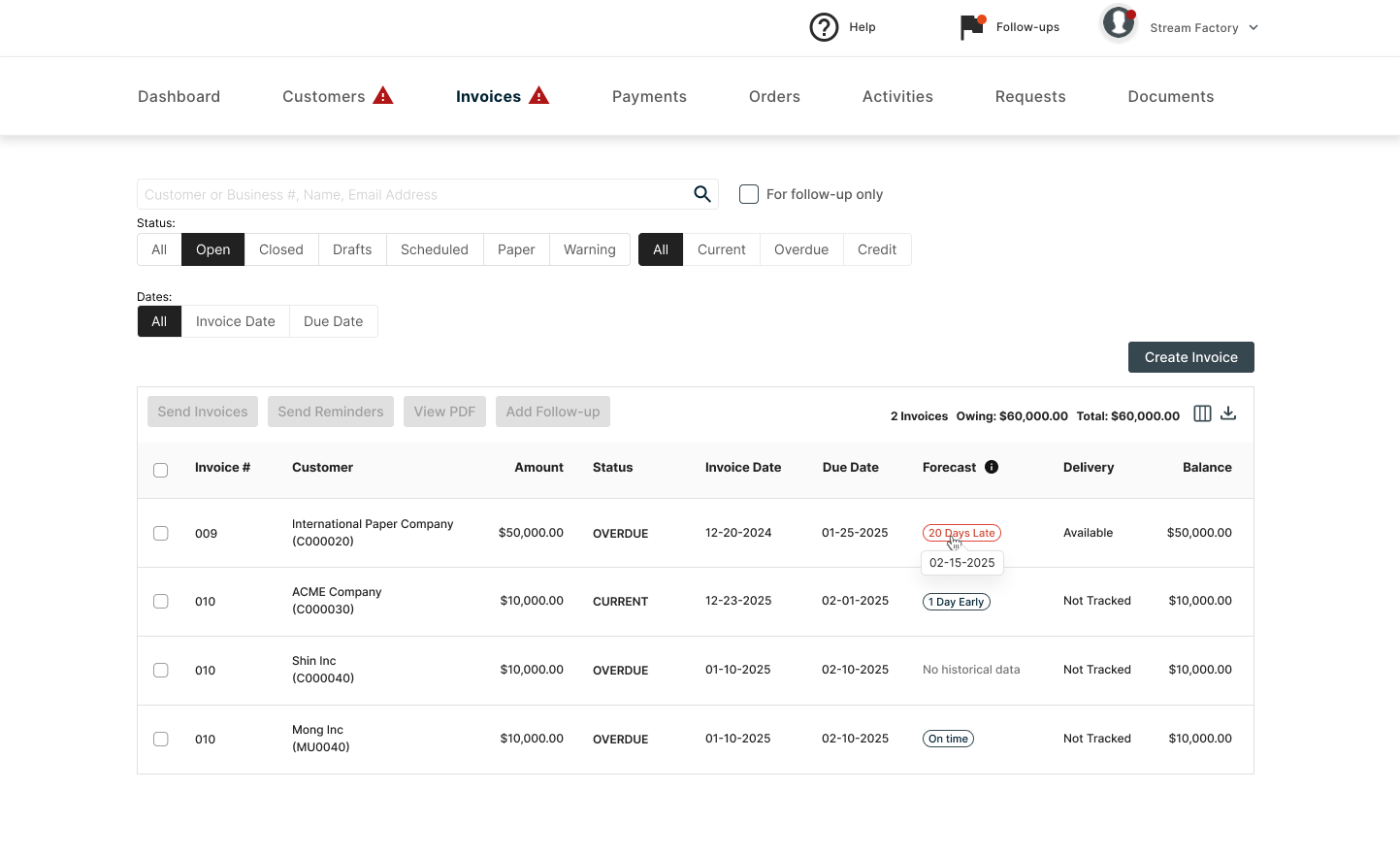
status at a glance, exact dates on hover, and AI explanations available on demand.
To validate this decision, I ran an A/B usability test.
Validation
Instead of designing maximum flexibility, PM and I intentionally scoped the solution.
10/15
10 out of 15 users preferred Scenario 1 because:
- Intuitive and clean design
- Hover interaction - sufficient information
- Low cognitive load
This allowed us to align user needs with PM concerns, without sacrificing clarity or control.
Decision 3 — Adapting to Technical Constraints and Design for the Reality of AI
Trade-off: Wait for perfect AI vs. ship something honest now
The Situation
- Design finalised.
- PM and Eng approved.
- Ready to hand off.
Suddenly AI/ML Engineer came to me and said:
“Chuck, we are not confident about AI accuracy yet to show exact date forecast."

Wait for better AI (2-3 months) vs. Adapt the design now?
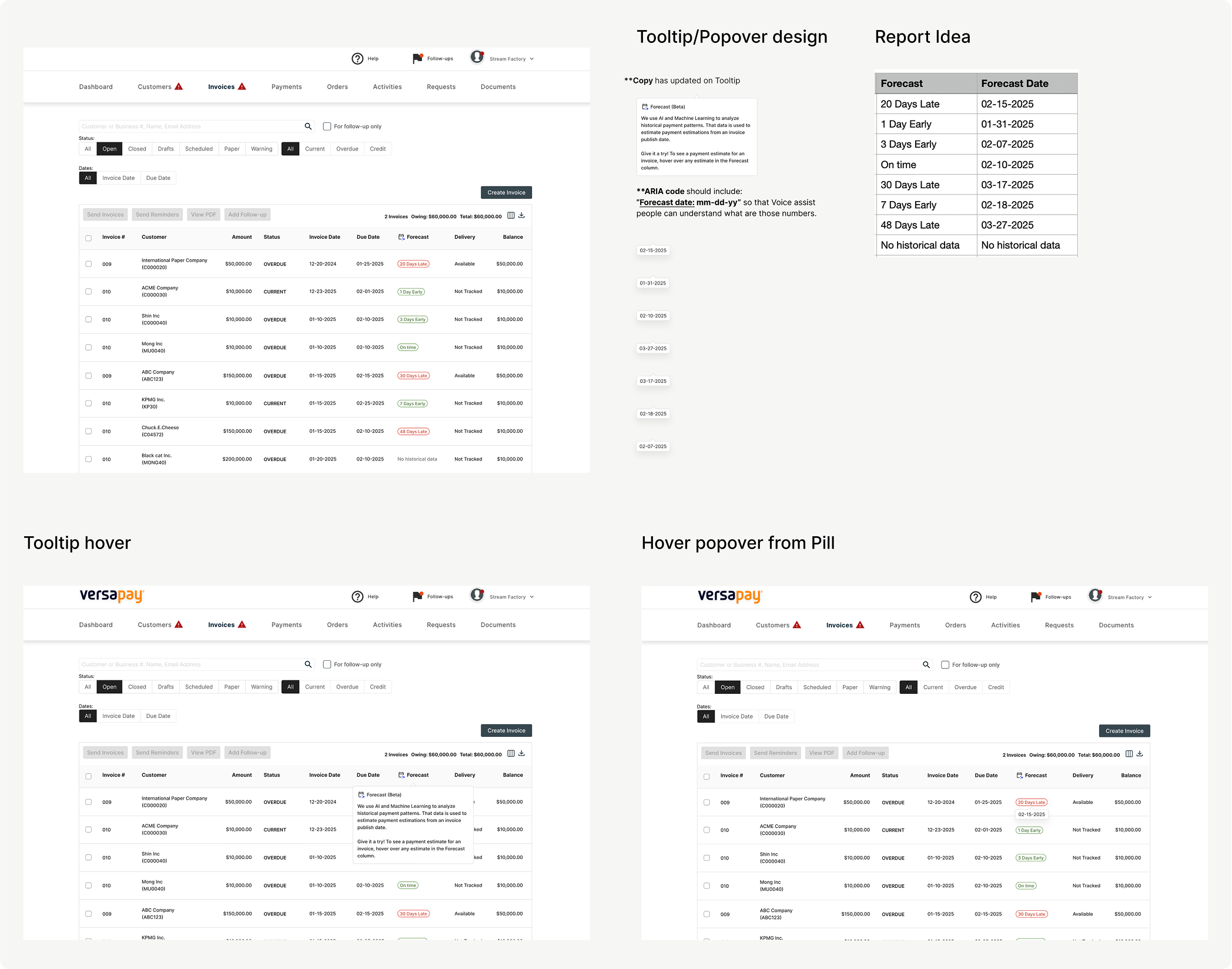
Rather than delaying the feature for months, I adapted the design to reflect what the AI could reliably support today.
We leaned into:
- Clear status buckets
- Transparent messaging about how predictions are generated
- Avoiding over-precision that could erode trust
This kept the experience useful — without overpromising.
On time
1 Day Early
30 Days Late
→
On time
Early
Late
Final Design
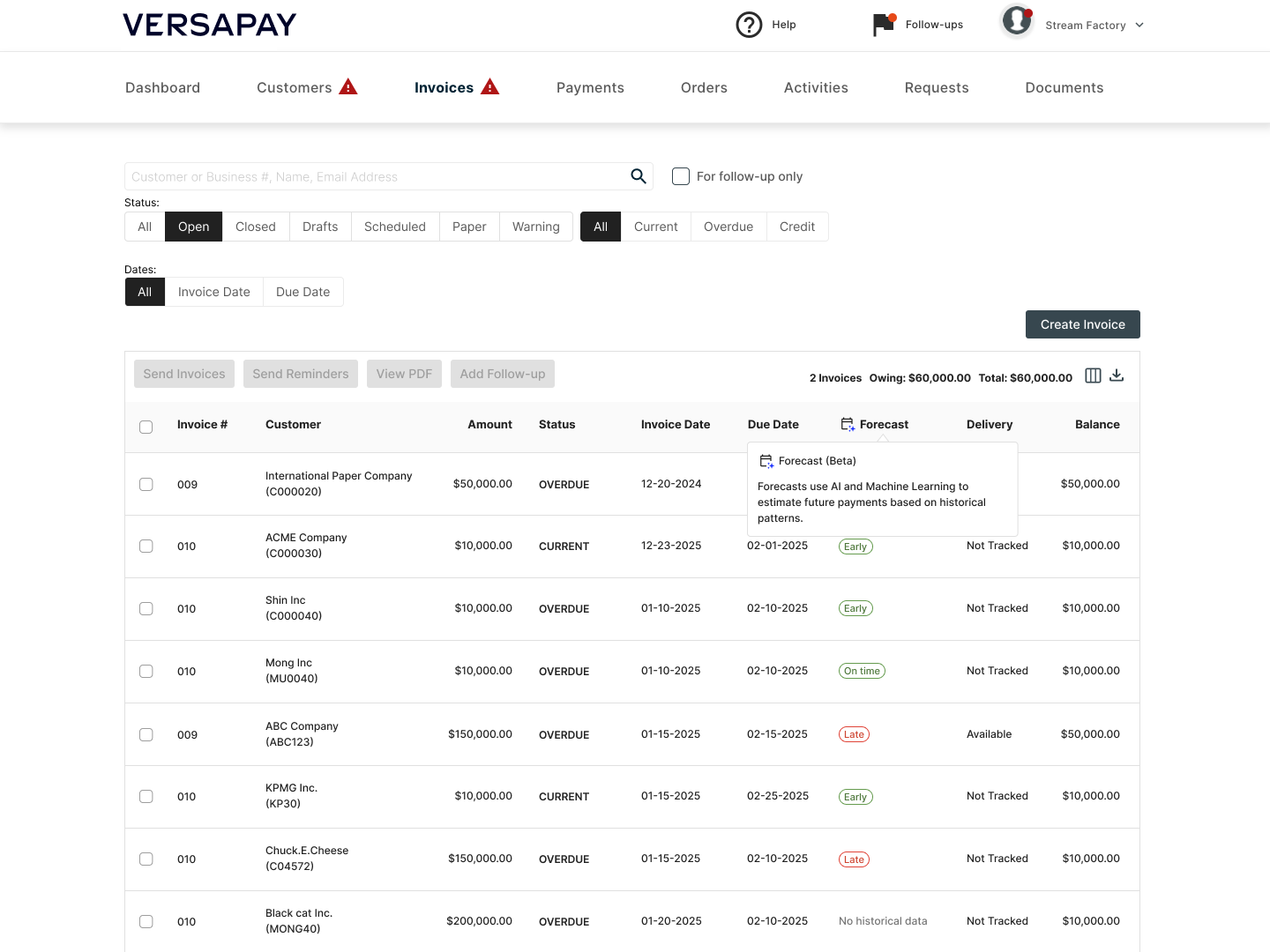

Forecast (Beta)
Forecasts use AI and Machine Learning to estimate future payments based on historical patterns.
The Outcome
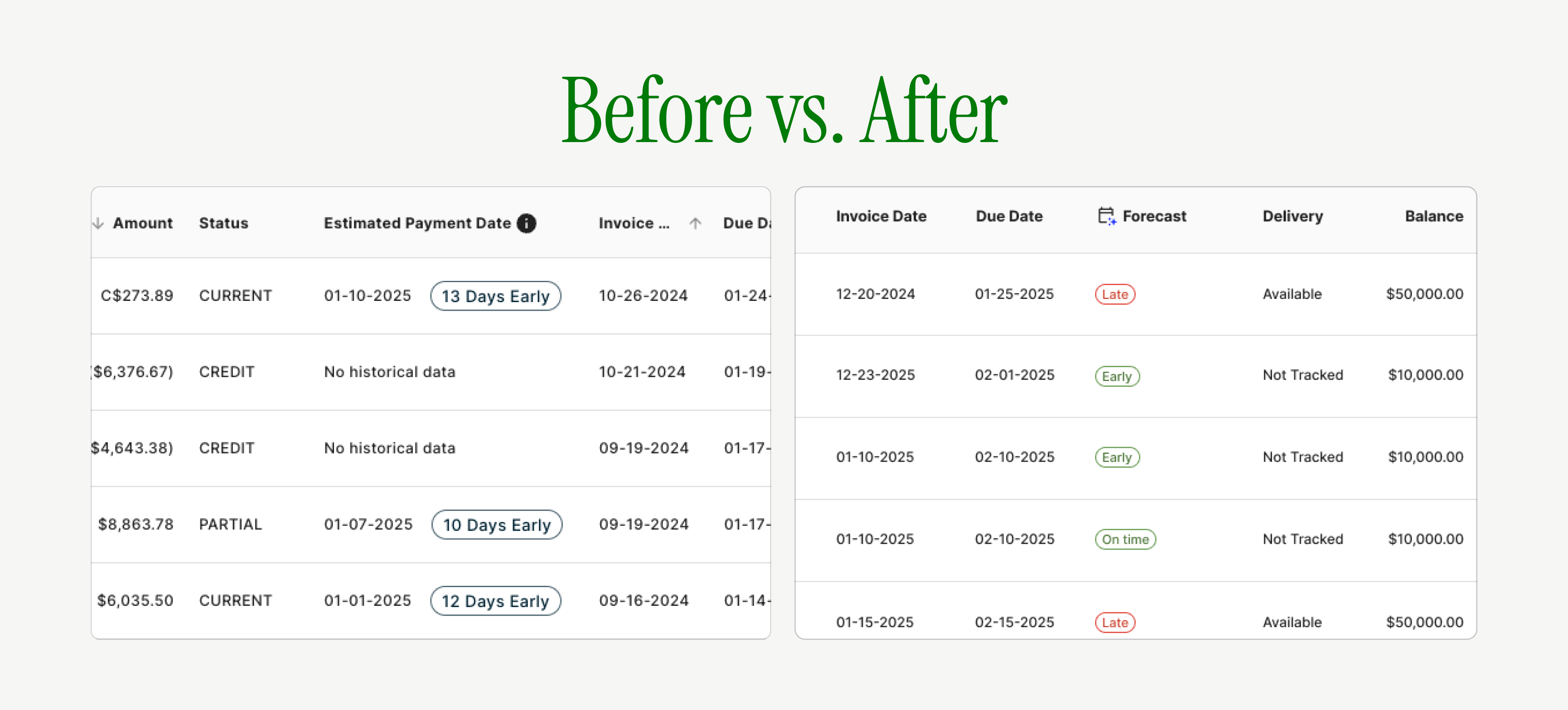
Before
- Dense information
- No AI indicators
- “Estimated Payment Date” sounded final and deterministic
After
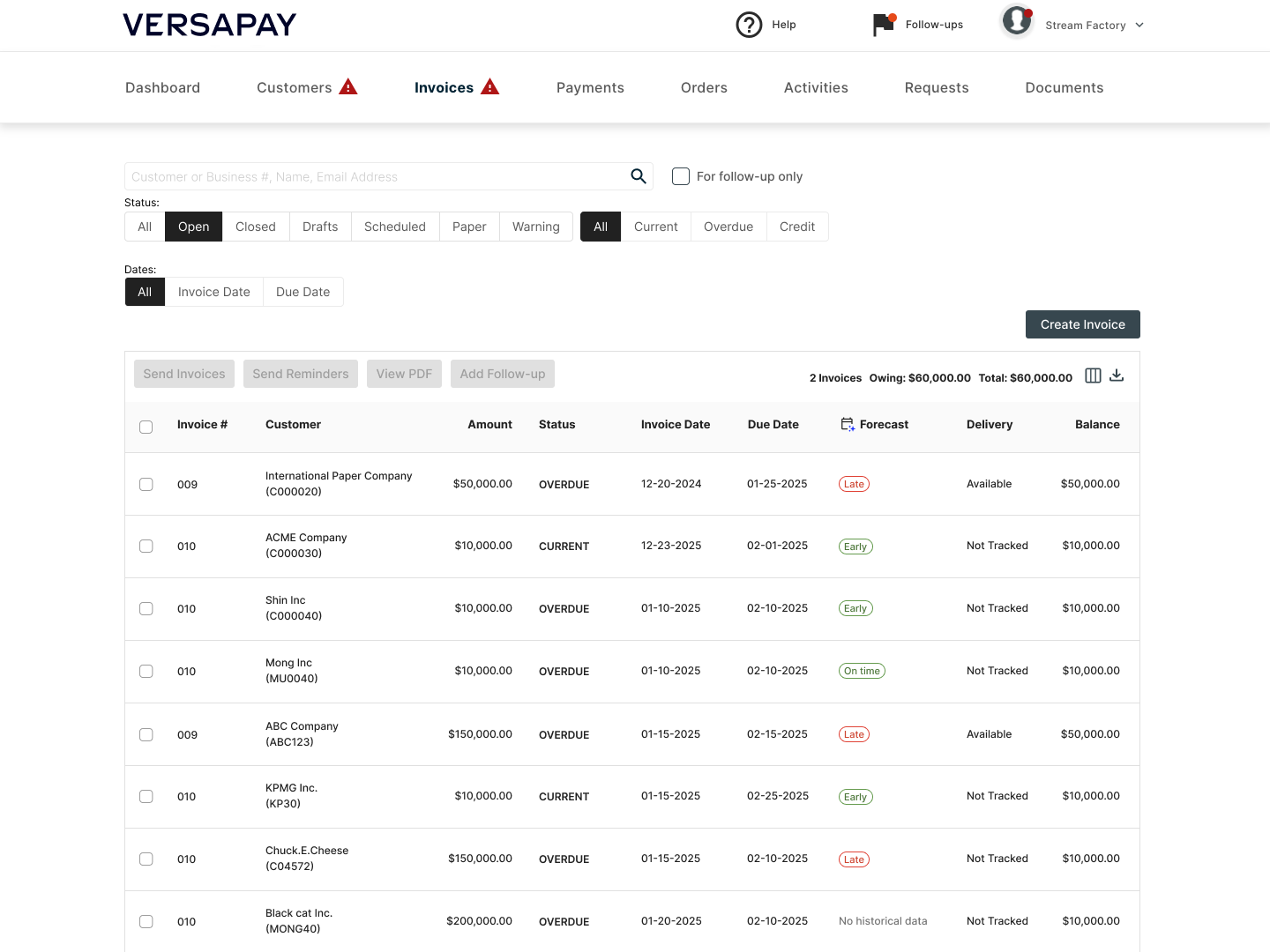
- “Forecast” sets the right expectation
- Clear, scannable status at a glance
- AI transparency built into the interaction
Impact
User Impact
- Faster prioritization through clear status signals
-
- Greater confidence in follow-up decisions
-
- Reduced over-trust and under-trust in predictions
Business Impact
- More effective AR workflows
- Stronger customer relationships through better-timed outreach
- Increased adoption of AI-driven features
Org Impact
- Established a new internal standard for AI transparency
- Influenced how other predictive features were designed and communicated
- Sparked broader conversations around AI patterns in the design system
Reflection
TEAM COLLABORATION
If I were to do this again, I’d align with AI and engineering constraints even earlier.
Earlier technical validation could have reduced late-stage pivots but the experience reinforced something important:

Forecast AI reinforced something critical for me:
Honest AI design builds more trust than perfect-looking predictions.
Case Study
Forecast AI
Forecast AI helps AR teams interpret AI predictions correctly not blindly trust them.
Role
Lead Product Designer
Team
PM, Engineering squad, AI/ML Engineer
Timeline
~ 3 weeks
Overview
I led the redesign of Forecast AI, an invoice payment prediction feature, to address a deeper trust issue hiding behind a simple UI request.
Instead of optimizing for speed or visual polish, this project focused on how users understand, trust, and act on AI-driven predictions in financial workflows.
Why Forecast AI?
Users who are Account Recievable manager/Collectors, they need to track cashflow manually for their financial decision such as budgeting, follow up with customers, decision for credit increase/decrease etc.
They had some pain points:
- Relying on "gut feeling" and personal relationships to predict payments
- Using manual notes like "Customer A is always 20 days late but always pays."
- Struggling with handoffs when team members were absent → affects customer relationships
The Real Problem
The column header was too long and was breaking the table layout (in QA environment). On the surface, this looked like a straightforward UI fix.
The original request from PM:
"Can you shorten 'Estimated Payment Date' ?The table layout is breaking."
But, was that a real problem?
I quickly ran user interviews through usertesting.com (4 ICP users)
But when I looked closer, I saw a bigger risk:
- User didn’t recognise this is from AI/ML
- Users were treating AI predictions as deterministic dates, not probabilistic guidance.
- When predictions were slightly off, trust in the entire system dropped and users reverted to manual tracking.
This wasn’t a layout problem. It was a trust and interpretation problem.
User interview sessions at Usertesting.com
What I Anchored On - Frame the real problems
Before jumping to solutions, I validated whether this trust issue was real. From quick user interviews and pattern analysis, three issues stood out:
No AI transparency
Users had no signal that predictions were AI-generated.
High cognitive load
Dense date + day-count information made the table hard to scan.
Tribal knowledge lived outside the system
Relationship-based payment patterns existed only in people’s heads.
These insights reframed the goal:
Design an AI experience that users can interpret correctly with trust and offer the valuable information to take actions.
Trade-off:
Ship fast vs. fix the root issue. I chose to push back on the quick fix and reframe the problem as:
From
"Shorten 'Estimated Payment Date'"
→
To
How might we clearly communicate AI predictions and its uncertainty?
How might we reduce cognitive load while maintaining information depth?
How might we capture relationship knowledge in the system?
Three Strategic Design Decisions
Decision 1 —Naming & UX Writing: Setting the Right Mental Model
Trade-off: Clarity vs. false certainty
“Estimated Payment Date” sounded deterministic.
→ Users treated it as a promise.
I renamed it to “Forecast” to signal probability, not certainty.
Like a weather forecast, the word signals probability rather than certainty, resetting expectations before any interaction happens.
Estimated Payment Date
→
Forecast
Additional context with Tooltip
To reinforce that mental model, I paired the name with concise tooltip copy that explains the prediction is AI-generated and based on historical payment behavior.
This wasn’t just UX writing. it was a deliberate trust-setting decision.
Forecast
Forecast (Beta)
We use AI and Machine Learning to analyze historical payment patterns. That data is used to estimate payment estimations from an invoice publish date.Give it a try! To see a payment estimate for an invoice, hover over any estimate in the Forecast column.
Decision 2 — Use Progressive Disclosure to Reduce Cognitive Load
Trade-off: Show everything vs. show what matters first
PM
Show everything at once (Status + Days + Date)
Users
Low cognitive load, scannable interface
A/B Testing
I designed a progressive disclosure model:
status at a glance, exact dates on hover, and AI explanations available on demand.
To validate this decision, I ran an A/B usability test.
Validation
Instead of designing maximum flexibility, PM and I intentionally scoped the solution.
10/15
10 out of 15 users preferred Scenario 1 because:
- Intuitive and clean design
- Hover interaction - sufficient information
- Low cognitive load
This allowed us to align user needs with PM concerns, without sacrificing clarity or control.
Decision 3 — Adapting to Technical Constraints and Design for the Reality of AI
Trade-off: Wait for perfect AI vs. ship something honest now
The Situation
- Design finalised.
- PM and Eng approved.
- Ready to hand off.
Suddenly AI/ML Engineer came to me and said:
“Chuck, we are not confident about AI accuracy yet to show exact date forecast."
Wait for better AI (2-3 months) vs. Adapt the design now?
Rather than delaying the feature for months, I adapted the design to reflect what the AI could reliably support today.
We leaned into:
- Clear status buckets
- Transparent messaging about how predictions are generated
- Avoiding over-precision that could erode trust
This kept the experience useful — without overpromising.
On time
1 Day Early
30 Days Late
→
On time
Early
Late
Final Design

Forecast (Beta)
Forecasts use AI and Machine Learning to estimate future payments based on historical patterns.
The Outcome
Before
- Dense information
- No AI indicators
- “Estimated Payment Date” sounded final and deterministic
After
- “Forecast” sets the right expectation
- Clear, scannable status at a glance
- AI transparency built into the interaction
Impact
User Impact
- Faster prioritization through clear status signals
-
- Greater confidence in follow-up decisions
-
- Reduced over-trust and under-trust in predictions
Business Impact
- More effective AR workflows
- Stronger customer relationships through better-timed outreach
- Increased adoption of AI-driven features
Org Impact
- Established a new internal standard for AI transparency
- Influenced how other predictive features were designed and communicated
- Sparked broader conversations around AI patterns in the design system
Reflection
TEAM COLLABORATION
If I were to do this again, I’d align with AI and engineering constraints even earlier.
Earlier technical validation could have reduced late-stage pivots but the experience reinforced something important:
Forecast AI reinforced something critical for me:
Honest AI design builds more trust than perfect-looking predictions.
Contents
Overview
Problem
Solution
Research
Testing
Impact
Process
Reflection
Case Study
Forecast AI
Forecast AI helps AR teams interpret AI predictions correctly not blindly trust them.
Role
Lead Product Designer
Team
PM, Engineering squad, AI/ML Engineer
Timeline
~ 3 weeks
Overview
I led the redesign of Forecast AI, an invoice payment prediction feature, to address a deeper trust issue hiding behind a simple UI request.
Instead of optimising for speed or visual polish, this project focused on how users understand, trust, and act on AI-driven predictions in financial workflows.
Why Forecast AI?
Users(Account Receivable team) need to track cashflow manually for their financial decision such as budgeting, follow up with customers, decision for credit increase/decrease etc.
They had some pain points:
- Relying on "gut feeling" and personal relationships to predict payments
- Using manual notes like "Customer A is always 20 days late but always pays."
- Struggling with handoffs when team members were absent → affects customer relationships
The Real Problem
The column header was too long and was breaking the table layout (in QA environment). On the surface, this looked like a straightforward UI fix.
The original request from PM:
"Can you shorten 'Estimated Payment Date' ?The table layout is breaking."
But, was that a real problem?
I quickly ran user interviews through usertesting.com (4 ICP users)
But when I looked closer, I saw a bigger risk:
- User didn’t recognise this is from AI/ML
- Users were treating AI predictions as deterministic dates, not probabilistic guidance.
- When predictions were slightly off, trust in the entire system dropped and users reverted to manual tracking.
This wasn’t a layout problem. It was a trust and interpretation problem.
User interview sessions at Usertesting.com
What I Anchored On - Frame the real problems
Before jumping to solutions, I validated whether this trust issue was real. From quick user interviews and pattern analysis, three issues stood out:
No AI transparency
Users had no signal that predictions were AI-generated.
High cognitive load
Dense date + day-count information made the table hard to scan.
Tribal knowledge lived outside the system
Relationship-based payment patterns existed only in people’s heads.
These insights reframed the goal:
Design an AI experience that users can interpret correctly with trust and offer the valuable information to take actions.
Trade-off:
Ship fast vs. fix the root issue. I chose to push back on the quick fix and reframe the problem as:
From
"Shorten 'Estimated Payment Date'"
→
To
How might we clearly communicate AI predictions and its uncertainty?
How might we reduce cognitive load while maintaining information depth?
How might we capture relationship knowledge in the system?
Three Strategic Design Decisions
Decision 1 —Naming & UX Writing: Setting the Right Mental Model
Trade-off: Clarity vs. false certainty
“Estimated Payment Date” sounded deterministic.
→ Users treated it as a promise.
I renamed it to “Forecast” to signal probability, not certainty.
Like a weather forecast, the word signals probability rather than certainty, resetting expectations before any interaction happens.
Estimated Payment Date
→
Forecast
Additional context with Tooltip
To reinforce that mental model, I paired the name with concise tooltip copy that explains the prediction is AI-generated and based on historical payment behavior.
This wasn’t just UX writing. it was a deliberate trust-setting decision.
Forecast
Forecast (Beta)
We use AI and Machine Learning to analyze historical payment patterns. That data is used to estimate payment estimations from an invoice publish date.Give it a try! To see a payment estimate for an invoice, hover over any estimate in the Forecast column.
Decision 2 — Use Progressive Disclosure to Reduce Cognitive Load
Trade-off: Show everything vs. show what matters first
PM
Show everything at once (Status + Days + Date)
Users
Low cognitive load, scannable interface
A/B Testing
I designed a progressive disclosure model:
status at a glance, exact dates on hover, and AI explanations available on demand.
To validate this decision, I ran an A/B usability test.
Validation
Instead of designing maximum flexibility, PM and I intentionally scoped the solution.
10/15
10 out of 15 users preferred Scenario 1 because:
- Intuitive and clean design
- Hover interaction - sufficient information
- Low cognitive load
This allowed us to align user needs with PM concerns, without sacrificing clarity or control.
Decision 3 — Adapting to Technical Constraints and Design for the Reality of AI
Trade-off: Wait for perfect AI vs. ship something honest now
The Situation
- Design finalised.
- PM and Eng approved.
- Ready to hand off.
Suddenly AI/ML Engineer came to me and said:
“Chuck, we are not confident about AI accuracy yet to show exact date forecast."
Wait for better AI (2-3 months) vs. Adapt the design now?
Rather than delaying the feature for months, I adapted the design to reflect what the AI could reliably support today.
We leaned into:
- Clear status buckets
- Transparent messaging about how predictions are generated
- Avoiding over-precision that could erode trust
This kept the experience useful — without overpromising.
On time
1 Day Early
30 Days Late
→
On time
Early
Late
Final Design

Forecast (Beta)
Forecasts use AI and Machine Learning to estimate future payments based on historical patterns.
The Outcome
Before
- Dense information
- No AI indicators
- “Estimated Payment Date” sounded final and deterministic
After
- “Forecast” sets the right expectation
- Clear, scannable status at a glance
- AI transparency built into the interaction
Impact
User Impact
- Faster prioritisation through clear status signals
- Greater confidence in follow-up decisions
- Reduced over-trust and under-trust in predictions
Business Impact
- More effective AR workflows
- Stronger customer relationships through better-timed outreach
- Increased adoption of AI-driven features
Org Impact
- Established a new internal standard for AI transparency
- Influenced how other predictive features were designed and communicated
- Sparked broader conversations around AI patterns in the design system
Reflection
TEAM COLLABORATION
If I were to do this again, I’d align with AI and engineering constraints even earlier.
Earlier technical validation could have reduced late-stage pivots but the experience reinforced something important:
Forecast AI reinforced something critical for me:
Honest AI design builds more trust than perfect-looking predictions.